Create Workflow Campaign
Workflow campaigns allow you to run contacts through a visual automation map. These can include a mix of emails, AI calls, and data syncs.
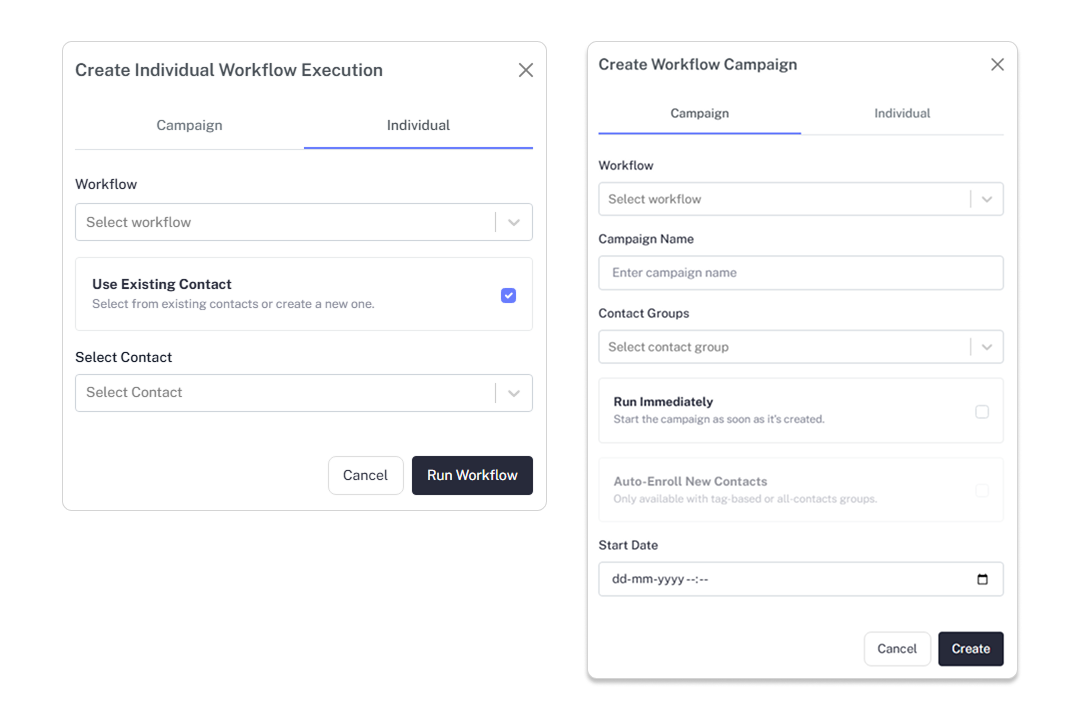
Campaign Setup
Select Workflow
Choose from your list of saved workflow designs. Ensure the workflow has been tested on the canvas before deployment.
Define Execution Parameters
- Campaign Name: A descriptive title for tracking.
- Contact Groups: Choose the segments that will enter the workflow.
Enrollment Logic
- Run Immediately: Start the journey for all contacts in the group as soon as you click 'Create'.
- Auto-Enroll New Contacts: Automatically trigger the workflow for any new contact added to the selected group in the future.
Start Date
Schedule a future date/time if you do not wish to run the campaign immediately.
Tracking Workflow Progress
The campaign dashboard provides real-time visibility into the journey:
- Progress Bar: Shows the percentage of contacts who have reached the 'End' node.
- Node Metrics: View how many emails were sent, calls made, or API requests triggered by this specific campaign.
- Execution Logs: Click the history icon to see the granular path taken by individual contacts.
Pro Tip: Use 'Auto-Enroll' for "Welcome Sequences" so that any new lead signed up via your website is automatically started on the workflow.