Actions
Actions extend what your assistant can do beyond conversation. They connect the assistant to real-world systems booking calendars, internal APIs, or human agents at precisely the right moment in a call.
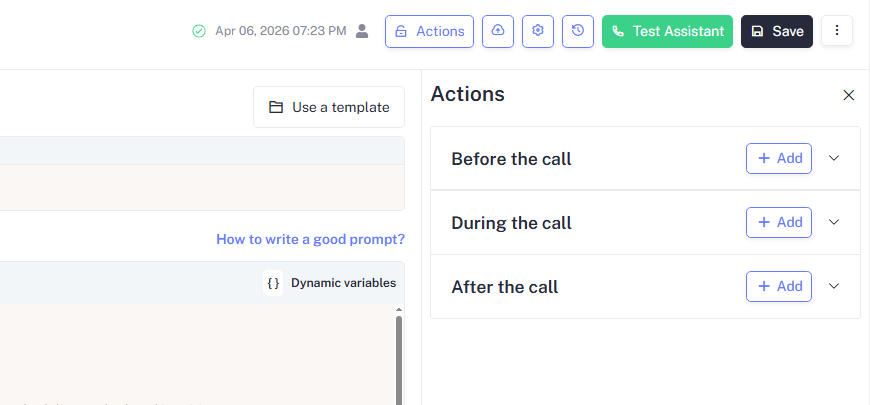
Actions are grouped into three phases based on when they run:
| Phase | When It Runs |
|---|---|
| Before the call | Executed once before the assistant says anything used to fetch or prepare data |
| During the call | Triggered mid-conversation based on what the caller says or does |
| After the call | Executed once the call ends used to log, sync, or notify |
Before the Call
Before the call actions run automatically even before the assistant starts. Use them to fetch live data such as a customer's name, account status, or appointment history so the assistant enters the conversation already informed.
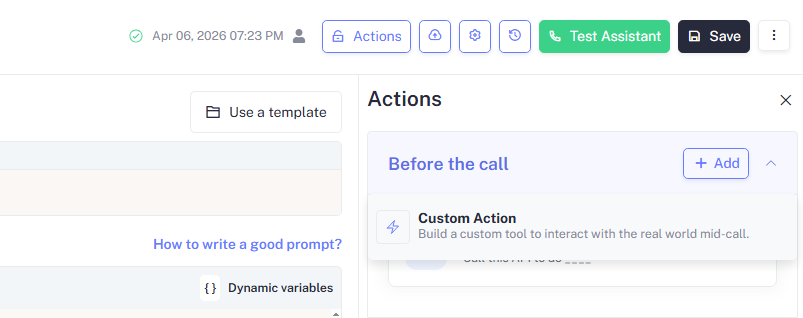
Click + Add under Before the call to add an action. The available action type is:
| Action | Description | Configuration |
|---|---|---|
| Custom Action | Build a custom tool to interact with the real world pre-call |
Use a Before the Call Custom Action to pre-load a contact's details from your CRM. The assistant can then greet the caller by name and reference their account without asking for it during the call.
During the Call
During the call actions are triggered mid-conversation when the assistant detects a specific intent, keyword, or condition. Click + Add under During the call to add an action. Three action types are available:
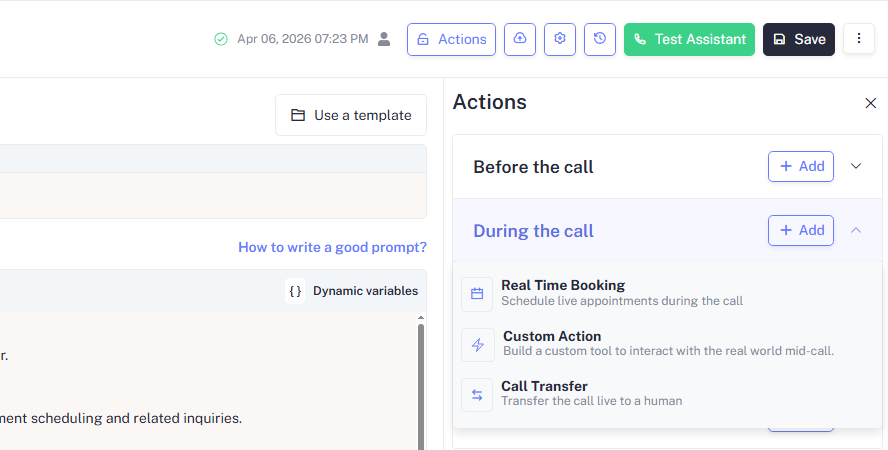
| Action | Description | Configuration |
|---|---|---|
| Real Time Booking | Schedule live appointments during the call | Configure → |
| Custom Action | Build a custom tool to interact with the real world mid-call | Configure → |
| Call Transfer | Transfer the call live to a human | Configure → |
Real Time Booking
Real Time Booking enables you to schedule a live appointment during the call without any human involvement.
| Field | Description |
|---|---|
| Calendar | The connected calendar the assistant books into Google Calendar, Calendly, or similar |
| Event duration | How long each appointment slot should be |
| Buffer time | Padding added between appointments to avoid back-to-back bookings |
| Confirmation | Whether the assistant reads back the booked time to the caller before ending the call |
Real Time Booking requires a connected calendar integration. Go to Integrations to connect your calendar before configuring this action.
Pair Real Time Booking with a confirmation step in your prompt. Instruct the assistant to always read back the booked date and time so the caller leaves the call with no ambiguity about their appointment.
Custom Action
Custom Action enables you to build a custom tool that interacts with any external system mid-call such as checking order status, verifying account details, or submitting a form in real time.
| Field | Description |
|---|---|
| Name | A label that tells the assistant when to trigger this action (e.g., check_order_status) |
| Description | Explains to the assistant what this action does and when it should be called |
| Endpoint URL | The API endpoint to call when the action is triggered |
| Method | HTTP method GET to retrieve data, POST to submit data |
| Headers | Authorization tokens or content-type headers required by your API |
| Parameters | Variables extracted from the conversation and passed into the request, such as {order_id} |
Write a clear Description for every Custom Action. The assistant uses the description to decide when to trigger the action a vague description leads to it firing at the wrong moment or not at all.
Custom Actions make live API calls during the call. Ensure your endpoint responds within 2–3 seconds slow responses create noticeable silence that degrades the caller experience.
Call Transfer
Transfers the call live to a human agent when the assistant cannot handle the situation or when the caller requests it.
| Field | Description |
|---|---|
| Transfer number | The phone number the call is forwarded to when transfer is triggered |
| Transfer type | Warm assistant briefs the human before handing off. Cold call connects immediately with no briefing |
| Trigger | The condition that initiates the transfer a keyword, a detected intent, or a maximum re-prompt count |
| Handoff message | What the assistant says to the caller just before transferring, e.g., "Let me connect you with a specialist" |
Warm transfer is recommended for complex or sensitive calls the assistant stays on the line briefly to brief the human agent, reducing the need for the caller to repeat themselves.
Always configure a fallback message for when the transfer number is unavailable or busy. Without one, the caller may experience silence or an abrupt disconnect if no human agent answers.
After the Call
After the call actions run automatically once the call ends. Use them to extract information, send follow-up messages, log outcomes, update records, or trigger downstream workflows without any manual effort.
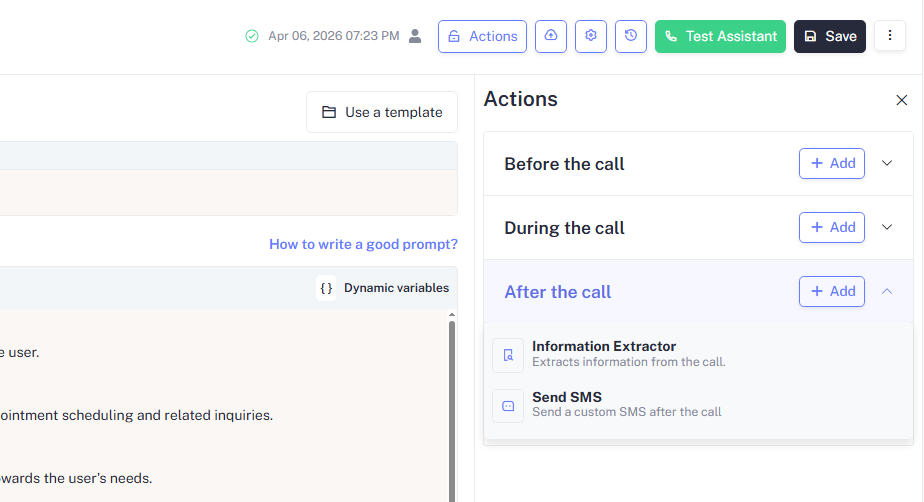
Click + Add under After the call to add an action. Three action types are available:
| Action | Description | Configuration |
|---|---|---|
| Information Extractor | Extracts structured information from the call | Configure → |
| Send SMS | Sends a custom SMS message after the call ends | Configure → |
Information Extractor
Information Extractor helps in pulling structured data out of the call transcript automatically once the conversation ends. Such as names, booking details, preferences, or any other variables your workflow needs downstream.
| Field | Description |
|---|---|
| Name | A unique identifier for this extractor |
| Description | Describes what information to extract and the context in which it appears |
| Variables | The specific fields to extract from the transcript, such as {caller_name} or {appointment_date} |
| Output | Where the extracted data is sent a webhook, CRM, or stored as dynamic variables |
Use Information Extractor to capture lead details, intent signals, or appointment preferences without relying on callers to fill out a form after the call. The extracted variables can feed directly into a Custom Action or CRM sync.
Send SMS
Send SMS enable you to share the SMS to the caller automatically after the call ends useful for confirmations, follow-up links, or summaries.
| Field | Description |
|---|---|
| To | The recipient's phone number typically {caller_number} to target the caller automatically |
| Message | The SMS body. Supports dynamic variables such as {appointment_date} or {caller_name} |
| Trigger | The condition that determines when the SMS is sent e.g., always, or only on a specific call outcome |
Use Send SMS to deliver appointment confirmations or booking summaries
immediately after a call. Include dynamic variables like {appointment_date}
and {caller_name} to personalise each message automatically.
Sending SMS requires a connected telephony number with SMS capability. Ensure your assigned phone number supports outbound SMS before configuring this action.
Actions at a Glance
| Action | Phase | What It Does | Page |
|---|---|---|---|
| Custom Action | Before the call | Fetches or prepares data before the assistant speaks | /docs/build/actions/custom-http-action |
| Real Time Booking | During the call | Books a live appointment mid-conversation | /docs/build/actions/real-time-booking |
| Custom Action | During the call | Calls an external API based on what happens in the call | /docs/build/actions/custom-http-action |
| Call Transfer | During the call | Hands the call off to a human agent live | /docs/build/actions/call-transfer |
| Information Extractor | After the call | Pulls structured data from the call transcript | /docs/build/actions/information-extractor |
| Send SMS | After the call | Sends a custom SMS to the caller after the call ends | /docs/build/actions/send-sms |