Quickstart
Get your first AI call assistant live in under 15 minutes. With minimal coding required.
Make sure you have a free Botphonic account (opens in a new tab) before starting.
Create your account
Go to app.botphonic.ai/register (opens in a new tab) and sign up. Your 14-day free trial starts immediately no credit card needed.
Create a new Assistant
From the dashboard, click Assistant. You’ll see a modal like this.
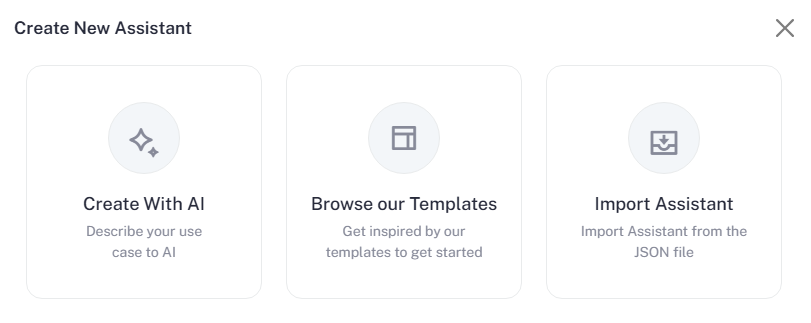
You have three ways to create your assistant:
1. Create With AI
Describe your use case, and let AI generate the assistant automatically.
- Outbound: Proactively reach your contacts. The AI initiates outgoing calls via traditional phone lines, triggers programmatically via REST API, or automates outreach directly through HighLevel CRM workflows.
- Inbound: Convert every incoming lead. The AI handles incoming calls 24/7, utilizing intelligent workflows to resolve inquiries via REST API data fetches or managing customer journeys within HighLevel.
Once you write your prompt and click Create with AI, Botphonic will automatically:
- Generate a complete assistant setup
- Define the conversation flow
- Configure default responses and logic
- Prepare it for further customization
You can then review and edit everything, including flow nodes, voice settings, and integrations.
2. Browse our Templates
Choose from pre-built templates and quickly create an assistant.
Available templates include:
- Lead Qualification
- Appointment Booking
- Customer Support
- Sales Outreach
- Virtual Receptionist
3. Import Assistant
Already have an existing setup?
- Upload a JSON configuration file
- Instantly recreate and deploy your assistant with all settings pre-configured
Need help? Book a live demo (opens in a new tab) and our team will walk you through setup with your specific use case.