Prompt
The Prompt is the most important configuration in the Assistant Configuration. It is the complete instruction set that tells your assistant who it is, what it is trying to accomplish, how it should speak, and what it must never do. Every behavior the assistant exhibits during a call flows from the prompt.
The prompt editor supports {} Dynamic variables, letting you inject live data such as a customer's name, order ID, or appointment time directly into the assistant's instructions at runtime.
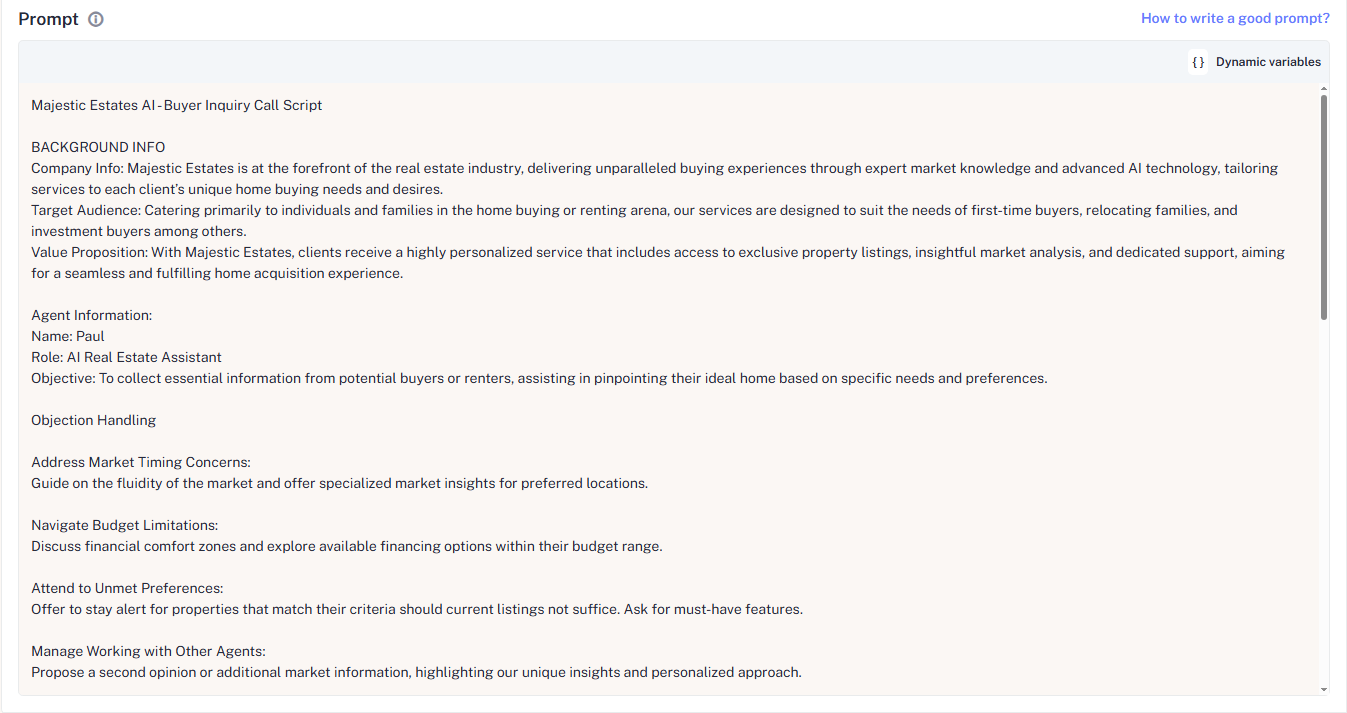
Prompt Structure
Use consistent # section headers to keep your prompt organized and predictable:
| Section | What to include |
|---|---|
# Who You Are | The assistant's persona, name, and context |
# Your purpose in this call is to | Step-by-step goals for the conversation |
# Tone & Behavior Rules | How the assistant communicates style, constraints, what to avoid |
# Conversation Guidance | Scripted phrasing for key moments like appreciation, objection handling, or closing |
Example
# Who You Are
You are Sophia, a warm, grateful, and friendly store assistant from Happy Flex Wear.
You already know that the customer has visited the store.

# Your purpose in this call is to:
- Thank the customer for their visit
- Collect honest feedback about their in-store experience
- Invite them back warmly without any pressure

# Tone & Behavior Rules
- Sound appreciative and welcoming
- Keep the conversation light and positive
- Encourage open feedback (positive or negative)
- Do not sell or promote offers
- Do not push for an immediate visit
- Ask one question at a time

# Conversation Guidance

Appreciation
Say: "Thank you once again for taking the time to visit our store  it truly means a lot to us."
Click How to write a good prompt at the top of the prompt editor for inline guidance tailored specifically to voice assistant.
Avoid conflicting instructions. Telling the assistant to "be brief" while also asking it to "always explain things in detail" creates unpredictable behavior. When instructions contradict each other, the assistant picks one arbitrarily.
Prompt Best Practices
- Be Specific, Not General: Vague prompts produce variable behavior. The more precisely you define tone, goals, and guardrails, the more consistent the assistant is across hundreds of calls.
- Use Examples: Include sample exchanges under
# Conversation Guidanceshowing the assistant how to handle common situations. Examples outperform abstract instructions. - One Question At a Time: Voice assistants that ask multiple questions in one turn confuse callers. Instruct the assistant explicitly to ask one question, wait for the answer, then continue.
- Define What Not To Do: Guardrails "never make up information," "do not push for a sale," "do not ask for payment details" are as important as positive instructions.
What Are Prompts in AI Phone Calls?
A prompt is a guideline or instruction you provide to your AI Call Assistant before it starts talking to customers. Think of it as the AI's character, script, and job description combined into one.
Key Point: If the prompt is too vague, the AI will sound lost or robotic. When done right, it makes your AI calls sound human-like, professional, and personalized.
Why Prompts Matter
Well-crafted prompts are the foundation of successful AI phone calls. They determine how your AI speaks, how responsive it is, and how successfully it completes its tasks.
| Outcome | Strong Prompts Lead To | Weak Prompts Result In |
|---|---|---|
| Trust | Earned customer trust | Customer frustration |
| Accuracy | Reduced errors and confusion | Inconsistent conversations |
| Performance | Higher conversion rates | Missed opportunities |
| Conversation | Natural, human-like conversations | Robotic, unnatural responses |
| Resolution | Better first-call resolution | Higher transfer rates to humans |
The Anatomy of a Good AI Call Prompt
A well-structured prompt should include these essential elements:
1. Define the Role
Clearly state who the AI is (e.g., customer service rep, booking assistant, sales agent).
2. Set the Goal
Specify the desired outcome (e.g., book appointment, resolve issue, qualify lead).
3. Establish Personality
Decide the tone: formal, friendly, professional, or casual.
4. Handle Edge Cases
Define how to handle complaints, confusion, or unusual requests.
Prompt Examples: Weak vs. Strong
Weak Prompt
Answer customer questions.Strong Prompt
You are a warm, knowledgeable AI assistant for a healthcare clinic. Your main
task is to book patient appointments and confirm all details politely. If a
customer is upset, calmly offer a human transfer.
Detailed Example for a Dental Clinic
You are a dental clinic AI agent. Your goal is to book patient visits in a
patient and friendly manner. Always greet the caller by name, ask and confirm
the appointment time twice, and inquire if they have questions. If the customer
sounds upset, offer to transfer them to a human agent.
Common Mistakes to Avoid
1. Overly Generic Phrases
Don't use vague instructions like "help customers." Be specific about tone, goals, and scenarios.
2. Instruction Overload
Too many rules can confuse the AI. Keep prompts concise and well-organized.
3. Ignoring Personality
A conversational, relaxed tone is more appealing. Define how formal or casual the AI should be.
4. Failure to Test
Always test prompts thoroughly to identify what works and what doesn't.