General Settings
General Settings controls your assistant's global behavior the timezone it operates in, how natural it sounds during conversation, and which AI model powers it.
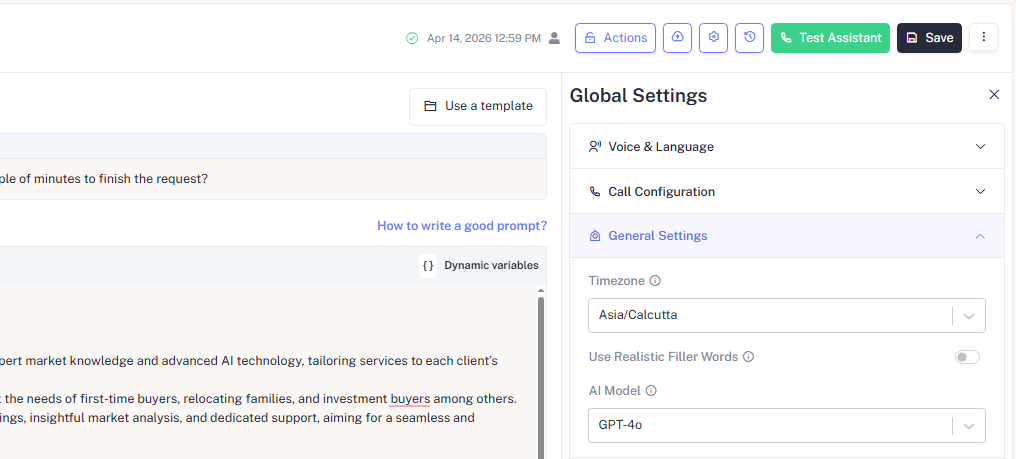
Timezone
| Setting | Description |
|---|---|
| Timezone | Sets the timezone context for your assistant used for time-aware logic in the prompt so the assistant says "Good morning" or "Good evening" correctly. Also ensures call windows and scheduling logic align with the correct local time |
The timezone selector defaults to your account's region.
For outbound campaigns: For targeting contacts in a specific geography ensure to set this to match the contact's local timezone.
For outbound assistants in regulated industries, always configure your timezone alongside a call window. Calling outside permitted hours can result in TCPA violations in the US or TRAI violations in India, both of which carry significant penalties.
Use Realistic Filler Words
When enabled, the assistant naturally inserts filler words such as "um," "uh," or "let me check that" into its responses to sound more human-like during pauses or while processing.
| State | Effect |
|---|---|
| Enabled | Assistant uses filler words during pauses, making the conversation feel more natural and human |
| Disabled | Assistant responds with clean, direct speech better suited for formal or transactional calls |
Enable Realistic Filler Words for warm, conversational use cases like customer feedback or appointment reminders. Disable it for formal contexts like legal notices or financial disclosures where precision matters more than warmth.
AI Model
The AI Model selector determines which underlying language model powers your assistant's responses.
| Setting | Description |
|---|---|
| AI Model | Choose the model that best balances response quality, speed, and cost for your use case. Defaults to GPT-4o |
Different models offer different trade-offs between response quality, latency, and cost. If you are unsure which model to use, leave it at the default GPT-4o it provides the best balance for most voice assistant use cases.
Model Options Overview
| Model | Best For |
|---|---|
| GPT-4o | Balanced performance ideal for most assistants |
| GPT-4.1 | Higher reasoning quality better for complex workflows |
| GPT-4.1 mini | Faster & cost-effective suitable for simple or high-volume use cases |