Voice & Language Configuration
Voice Configuration controls how your assistant sounds and how it listens during a live call. These settings directly affect the caller experience a misconfigured voice feels robotic, and wrong sensitivity causes the assistant to cut callers off mid-sentence.
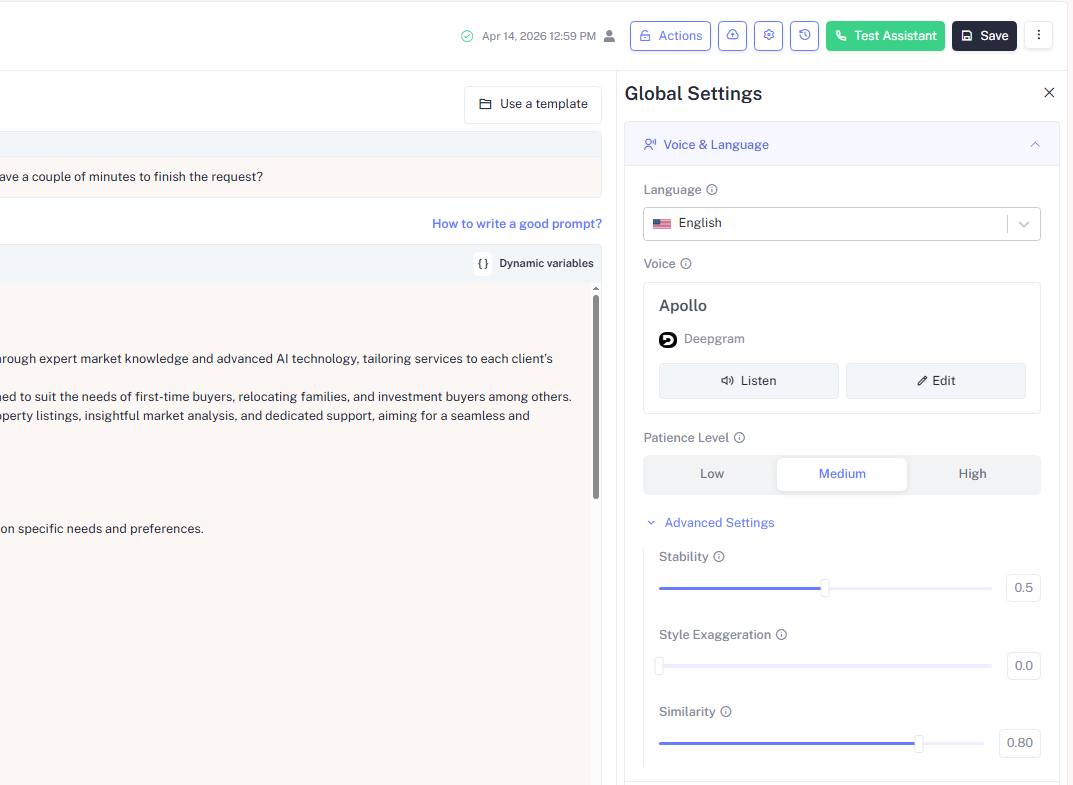
Language
Set the primary language the assistant speaks and listens in. This determines which voice models are available for selection and how the speech recognition engine interprets the caller's input.
Set the assistant's primary operating language here. This determines:
- Which voice models are available for selection in Voice Configuration
- How the speech recognition engine interprets and transcribes the caller's input
- Which system phrases and fallback messages are used
Voice
Your assistant's voice is powered by a selected model from a provider. In the example above, the assistant uses Apollo from Deepgram. Each provider has a distinct character:
| Provider | Character |
|---|---|
| Deepgram | Optimized for low-latency telephony fast, clear, and reliable on real phone calls |
| ElevenLabs | More expressive and human-sounding, best for brand experiences where richness matters |
| Sarvam | Designed for Indian languages and multilingual support natural, clear, and localized voice output |
Two actions are available directly on the voice card:
| Action | Description |
|---|---|
| Listen | Plays a preview of the selected voice so you can hear exactly how it sounds before saving |
| Edit | Opens voice selection to browse and switch to a different voice model or provider |
Always click Listen before saving. The same script sounds completely different across providers and voice models what reads well on paper may not sound right out loud.
Patience Level
Patience Level controls how long the assistant waits after the caller goes silent whether they finished speaking, are still thinking, or didn't respond at all before it re-prompts them.
| Level | Best For |
|---|---|
| Low | Fast-paced sales or support flows where hesitation is uncommon |
| Medium | General use balanced for most audiences (recommended default) |
| High | Elderly callers, complex topics, non-native speakers, or anyone who needs more time to gather their thoughts |
Setting patience too low causes the assistant to re-prompt callers who are still thinking, which feels rude and abrupt. Setting it too high creates awkward dead air on calls with fast, confident speakers. Start with Medium and adjust based on real call recordings.
Advanced Settings
Click Advanced Settings to expand three slider controls that fine-tune the expressive quality of the assistant's voice. These settings are specific to the voice model and provider selected.
Stability 0.5 (default)
Controls how consistent and predictable the assistant's voice sounds across sentences.
| Value | Effect |
|---|---|
| Low (toward 0.0) | More expressive and varied delivery the voice has more natural inflection but can sound inconsistent across long calls |
| High (toward 1.0) | More stable and uniform delivery reliable and predictable, but can feel flat or monotone |
A value of 0.5 balances natural variation with consistency, which works well for most call types.
Style Exaggeration 0.0 (default)
Amplifies the stylistic characteristics of the selected voice its energy, personality, and expressiveness.
| Value | Effect |
|---|---|
| 0.0 | The voice performs neutrally, closest to how it sounds in preview |
| Higher values | The voice becomes more dramatic and energetic useful for high-energy sales or engagement calls, but can sound unnatural if pushed too far |
Keep Style Exaggeration at 0.0 for professional or formal call types
such as customer support, feedback collection, or appointment reminders.
Increase it slightly only for outbound campaigns where energy and enthusiasm
are intentional.
Similarity 0.80 (default)
Controls how closely the assistant's generated speech adheres to the original trained voice model.
| Value | Effect |
|---|---|
| Low (toward 0.0) | The voice drifts further from the original model can introduce artifacts or inconsistency |
| High (toward 1.0) | The voice stays very close to the original trained model cleaner and more consistent output |
A value of 0.80 is recommended for most use cases. Only reduce this if you intentionally want more variation from the base voice.
Stability, Style Exaggeration, and Similarity interact with each other. A high Style Exaggeration combined with a low Stability can produce unpredictable and inconsistent audio quality. Change one slider at a time and use Listen to preview the result before saving.