Testing Your Assistant
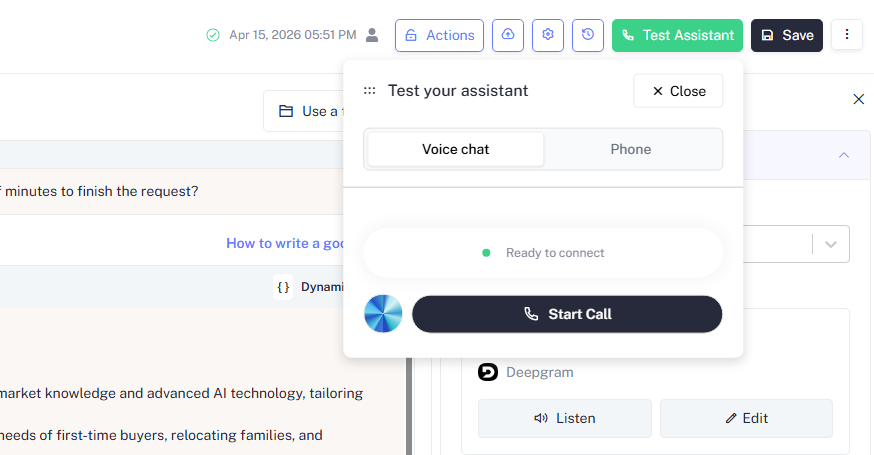
Before deploying, always test your assistant end-to-end using the Test Assistant panel. Click Test Assistant in the top right corner of the editor to open it.
There are two testing modes:
Voice Chat lets you test your assistant directly in the browser no phone number required.
Allow microphone access
Your browser will prompt for microphone permission. Click Allow to proceed.
Wait for connection
Once the panel shows a green Ready to connect indicator, your assistant is live and listening.
Start the call
Click Start Call. Speak naturally the assistant will respond in real time using your configured voice and flow.
End and review
Click End Call when done. Check the transcript and logs to review how the assistant handled the conversation.
Voice Chat uses your browser's audio input. For the most accurate test, use the same type of phrasing and pacing your real callers would use.
Saving and Versioning
Every time you click Save, Botphonic creates a version snapshot of the assistant's current configuration. You can:
- Roll back to any previous version at any time
- Promote a draft version to Live independently of other changes
- Label versions for clarity, such as
v1 - original,v2 - updated greeting,v3 - new knowledge base
Access all versions under Assistant Configuration → Version History.
Clicking Save does not automatically make the assistant live. You must explicitly promote a version to Live from Version History. This separation lets you safely iterate without affecting callers on an active deployment.
What's Next?
Knowledge Base
Upload docs and FAQs for grounded, accurate answers
Actions
Add API calls, CRM updates, and calendar bookings to your assistant.
Flow Designer
Build the conversation flow your assistant will follow step by step.
Target Audience
Define and manage the audience your assistant will engage with.
Campaign
Create and manage outreach campaigns.
Configure and send emails through your assistant.